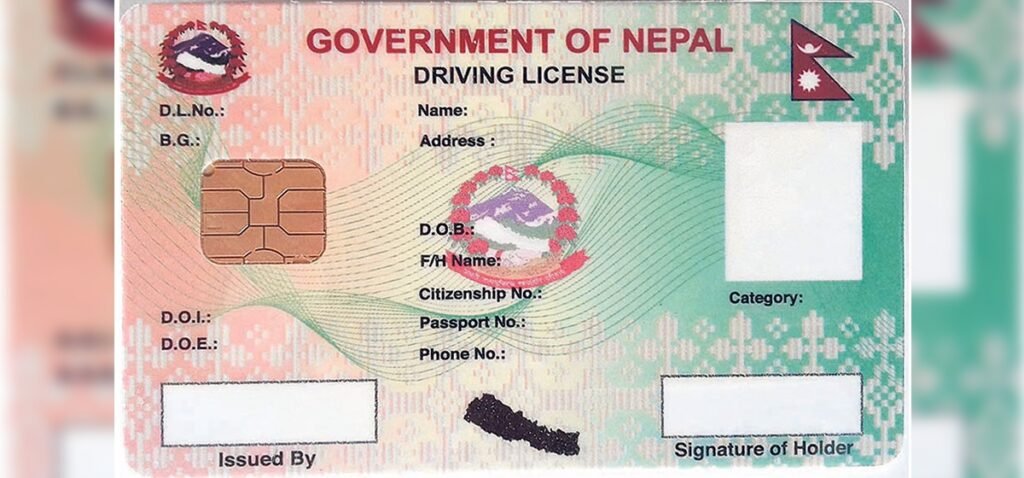
Getting a driving license in Nepal has become increasingly digital. Instead of starting the process by standing in a long queue at a transport office, applicants can now begin their driving license application online through the system operated by the Department of Transport Management (DoTM).
The process still includes important in-person steps such as document verification, biometric registration, written examination and the practical driving trial. However, the online system makes it easier to submit an application, select a license category and keep track of the application.
As Nepal continues to move toward the Electronic Driving License and Vehicle Registration System (EDLVRS), applicants should also be aware that the online process can vary depending on the province and transport office.
What Is a Driving License in Nepal?
A driving license is the official authorization that allows a person to drive a particular category of vehicle on Nepal’s roads. It is issued through the transport authorities under the Department of Transport Management.
Nepal uses different license categories for different types of vehicles. For example, A and K are associated with two-wheelers, while B is used for small four-wheel vehicles. Applicants must meet the required age and other eligibility conditions before applying.
According to the DoTM’s online driving-license information, the minimum age is 16 for two-wheelers in categories A/K, 18 for small vehicles in category B, and 21 for other vehicle categories.
Driving License Online Application in Nepal
The online application process has been changing as DoTM expands its EDLVRS platform. The department’s current website provides province-specific EDLVRS portals for Koshi, Madhesh, Bagmati, Gandaki, Lumbini, Karnali and Sudurpashchim.
For the latest application portal, start from the official Department of Transport Management website and use the driving-license/EDLVRS service listed there.
Step-by-Step Online Driving License Application
Although the exact screen layout may change as the new system is updated, the general process involves the following steps:
- Visit the official DoTM online license system.
Use the government transport website rather than unofficial websites or agents. https://dotm.gov.np - Select the appropriate province and service.
The current EDLVRS system provides separate provincial portals. Select the province and transport office relevant to your application. - Create or access your applicant profile.
Enter the required personal information carefully. In the existing online system, applicants are instructed to use a mobile number registered in their own name, and the number cannot simply be changed later. - Enter your personal details.
Provide information such as your name, date of birth, address and other identification details exactly as they appear on your official documents. - Choose the driving license category.
Select the vehicle category you are applying for. This is important because entering an incorrect category or incorrect personal information can cause problems with the application. DoTM specifically warns that incorrect personal or category information can result in cancellation. - Choose the transport office and available visit date.
Depending on the system and office, you may be required to select an office and appointment/visit information for verification and biometric registration. - Submit the application.
Review every detail before submitting. A small mistake in your name, date of birth, citizenship information or license category can create unnecessary delays. - Save your application details.
Keep your application number, registration details, receipt and other confirmation information. These details can be useful when checking your application later.
What Happens After Applying Online?
Online submission does not mean that the entire driving license process can be completed from home.
Applicants normally still have to appear at the designated transport office for identity/document verification and biometric registration. The application is then followed by the required examination process.
For a new driving license, applicants should be prepared for:
- Document and personal-information verification
- Biometric registration
- Written examination
- Practical driving examination or trial
- Payment of applicable government revenue/fees
- License production and distribution
DoTM offices continue to publish written-exam results and practical-exam notices, meaning applicants should regularly check their selected transport office’s official notices as well. Recent DoTM records, for example, show published written examination reports containing applicant IDs, registration numbers, categories and pass/fail status.
How to Check Driving License Status in Nepal Online
One of the most common questions after completing the examination is: “Where is my driving license?”
There are several online tools, and it is important to understand what each one actually checks.
1. Check Your License Number
The DoTM smart-card license search system allows users to enter their date of birth and license number to search license information. Apply DL
You can access the official Smart-Card License Search .
This is particularly useful when you already have a license number and want to verify the record.
2. Check Whether Your Printed Card Has Reached the Office
Some transport offices maintain their own online license-search pages. These pages can show information such as the license number, name, category and the date on which a printed license was dispatched to the relevant office.
For example, DoTM’s transport-office systems provide a Check Status function for license numbers.
The official DoTM website also regularly publishes lists of printed driving licenses that have been sent to individual transport offices.
This distinction matters: an application being approved does not necessarily mean that the physical smart card is already available for collection.
Why Is My Driving License Status Not Updated?
It is normal for applicants to see a delay between different stages of the licensing process.
For example, you may have passed the trial but still not see the printed card available. The transport office, central printing process and distribution system all have to update their records.
DoTM continues to publish printed-license information, including regular and priority/essential license lists, which indicates that printing and distribution remain separate stages of the overall process.
If your information is not appearing online, check:
- Whether you entered the correct license number
- Whether your date of birth matches the official record
- Whether you are checking the correct DoTM system
- Whether your selected transport office has published the relevant notice
- Whether the license has actually reached the office
If the online information remains unclear, contacting the transport office where your license was processed is usually the safest option.
Important Tips for a Nepal Driving License Application
A few simple precautions can prevent many problems.
Use your own mobile number. The DoTM online system instructs applicants to use a mobile number registered in their own name.
Check your details before submitting. Your name, date of birth, citizenship details and category should match your official documents.
Do not rely on unofficial websites. There are many websites explaining the Nepal driving license process, but application and status information should be verified through DoTM or the relevant provincial transport office.
Keep your receipts and application information. Do not throw away documents received during registration, examination or payment.
Check official notices regularly. Exam schedules, results, service interruptions and printed-license information can change, and transport offices frequently publish their own notices.
Frequently Asked Questions
Can I apply for a driving license online in Nepal?
Yes. DoTM operates online driving-license services, and the current EDLVRS system provides province-specific online portals. However, applicants still need to complete required physical verification, biometric and examination procedures.
What is the minimum age for a Nepal driving license?
The DoTM online system states that applicants must be at least 16 for A/K two-wheelers, 18 for category B small vehicles and 21 for other categories.
How can I check my driving license status?
If you have a license number, you can use the DoTM smart-card license search facility with your date of birth and license number. You can also check the relevant transport office’s license-search page for printed-card and dispatch information.
How long does it take to receive a smart driving license?
There is no single guaranteed delivery time for every applicant. Printing and distribution depend on the relevant transport office and the status of the license-production system. DoTM regularly publishes information about printed licenses sent to different offices.
Final Thoughts
The driving license process in Nepal is becoming more convenient through online services, but applicants should not assume that applying online means there is no need to visit a transport office. Verification, biometrics and examinations remain important parts of the process.
For the most reliable information, use the official DoTM website and the EDLVRS portal applicable to your province. Keep your application details safe, check official notices, and use the government’s license-status tools when tracking your application or smart card.
Because Nepal’s digital driving-license system is being updated, applicants should always verify the latest instructions before submitting an application or making a payment.
Official source: Department of Transport Management (DoTM)